
Get The Most Affordable Hosting in the World!
Starting at just $1.87/month, Vercaa offers unbeatable pricing for world-class web hosting services.
Fast, reliable, and secure hosting to power your website without breaking the bank. Plus, enjoy a free CDN for faster loading times worldwide!
Get Started Now!
Mass Mail is used for sending emails to the group of registered users. Users can be selected based on groups.
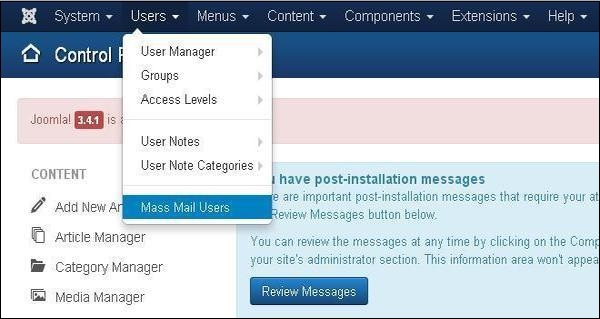
Step 1 − To use this feature, go to Users → Mass Mail Users as shown in the screen below.
Step 2 − The following screen shows Mass Mail window.
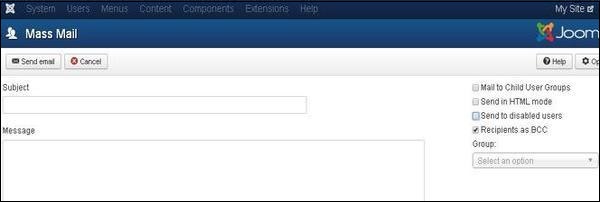
The Mass Mail window provides following options −
-
Subject − It is used for the Email subject.
-
Message − It adds the content of the Email.
-
Mail to Child User Groups − It is used to send Email to all child groups of the parent group.
-
Send in HTML Mode − It uses HTML code in the mail.
-
Send to disable users − Disable users will be included when sending mail, if it is checked.
-
Recipients as Bcc − It hides the recipient list and adds copy to site mail.
-
Group − It chooses a group to send the mail to.
At the top left, there's a toolbar with following options −
-
Send Mail − It is used to send an email once finished editing.
-
Cancel − It cancels the unsaved edits.
The End! should you have any inquiries, we encourage you to reach out to the Vercaa Support Center without hesitation.